Work from home sounds simple. You open your laptop. Log in and start working.
But the truth is different. A poor remote work setup drains your energy, slows your output, and increases stress. You may not notice it at first. But over time, it adds up.
You see the symptoms. Your back pain creeps in. Calls start to lag. Deadlines feel harder, and focus drops.
But a strong virtual workspace changes everything. It protects your health. It improves your productivity. It keeps your data secure. Most importantly, it gives you control over your workday.
This guide shows you exactly how to build a remote workspace that supports your success.
The Hidden Cost of a Weak Remote Work Setup
Remote and hybrid work continue to grow. The U.S. Bureau of Labor Statistics reports steady expansion of remote roles across industries. This shift means your home workspace now plays a major role in performance.
Many people underestimate that impact. They work from couches. They use poor lighting. They rely on unstable Wi-Fi.
The result is lower output and higher frustration. A weak work setting does not fail loudly. It fails slowly.
How to End Stress at Home By Designing a Productive Remote Work Setup?
Your workspace affects your focus, comfort, and results more than you realize. Let’s fix the common struggles every remote worker faces with the following steps.
1. Choose a Space That Signals Focus
Your remote work setup begins with choosing a defined area, not necessarily a large home office.
Pick a quiet space with strong lighting. Natural light is an even better option as it improves alertness. Research from the Harvard T.H. Chan School of Public Health links good indoor lighting to better sleep and cognitive performance.
Avoid working from your bed because that blurs mental boundaries. A clear physical space supports a clear mental state. A dedicated workspace helps your brain recognize it’s time to focus.
2. Protect Your Body Before It Starts to Hurt
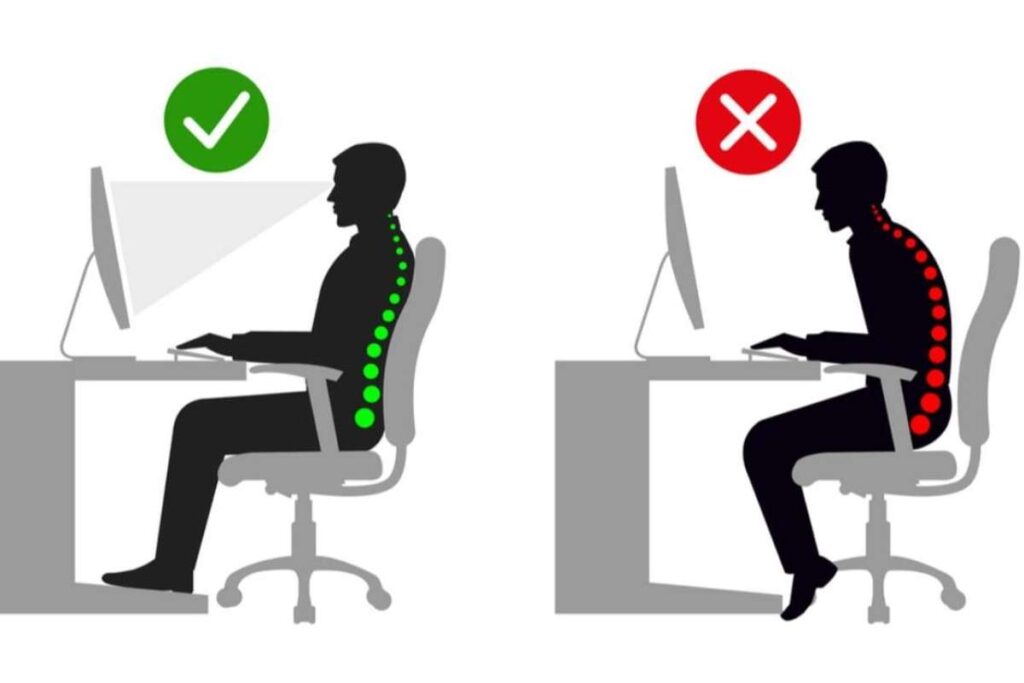
Most people ignore ergonomics until pain appears, and that is a mistake.
The Occupational Safety and Health Administration recommends proper chair support and correct monitor height to reduce strain. Your screen should sit at eye level, and your feet should rest flat on the floor.
A supportive chair costs less than physical therapy. An ergonomic setup protects your back, neck, and wrists every day.
3. Upgrade the Tools That Drive Your Output
Slow tools kill momentum. First and foremost, start with a reliable internet connection. The Federal Communications Commission defines broadband as 25 Mbps download and 3 Mbps upload. Many remote jobs need more video calls and cloud tools.
Use enough RAM to handle multitasking. Add a second monitor if you review data or write long documents.
A strong setup removes friction from your workflow.
4. Lock Down Your Workspace Before a Breach Happens
Security risks increase outside the office. Many people overlook this.
That’s why multi-factor authentication and regular updates are necessary for remote access. You must use strong passwords. Install updates quickly and secure your Wi-Fi with modern encryption.
If your employer provides a VPN, use it daily. A secure remote work setup protects company data and your reputation.
5. Stop Burnout Before It Takes Over
Remote work can stretch your day without warning.
The World Health Organization links long working hours to higher health risks. Considering this risk, you should set firm work hours. Block focus time on your calendar and step away during breaks.
Structure creates balance. A disciplined work routine includes time rules and not just equipment.
6. Make Every Video Call Work in Your Favor

Your camera setup affects how others see you. With a remote work setup optimized for video, your camera and audio become powerful tools.
Place your camera at eye level. Use front lighting instead of harsh overhead light, and keep your background clean.
Also, remember that clear audio matters just as much as lighting. That’s why you test your microphone before meetings. It helps you build credibility during every call.
7. Design for Deep Focus
Distractions steal hours from your week, and remote work allows distractions more often. With a well-planned remote work setup, you can reduce these interruptions.
Turn off non-work notifications during focus blocks. Keep your phone out of reach. Use simple tools that block distracting websites.
Your work-from-home setup should reduce noise, not add to it. As we all know, focus drives results.
8. Build a Setup That Supports Your Mental Health
Isolation is one of the alarming issues in remote working because it affects performance. One way to solve it is to stay intentional.
The Centers for Disease Control and Prevention recommends regular movement to lower stress. You just need to take short walks and stretch between meetings. It can make a huge difference.
You can also schedule check-ins with your teammates, as it helps to improve morale. A healthy remote work setup supports both productivity and well-being.
What Smart Leaders Do Differently to Maintain a Healthy Work Environment?
For leaders, it is very necessary to think beyond their own desks.
As a leader, you must offer equipment stipends. Share ergonomic guidance and provide cybersecurity training. These clear standards help to create consistency across teams.
Also, it is important to define communication tools and response expectations. A structured work environment at the company level reduces confusion and risk.
Avoid the Small Mistakes That Cause Big Problems in a Remote Work Environment

Even minor habits can quietly reduce your productivity and create risks. So, fix them early to make your remote work setup strong.
- Pay attention to your posture. Bad ergonomics leads to discomfort and long-term health issues.
- Keep your software and devices updated. Outdated systems create security and performance problems.
- Ensure your internet is stable and fast. Weak Wi-Fi slows work and frustrates meetings.
- Separate work and personal devices, especially when handling sensitive data. Mixing them increases security risks.
Addressing these small issues can dramatically improve your focus, safety, and efficiency at home.
Conclusion:
Remote and hybrid work aren’t going anywhere, and employers now expect the same level of professionalism at home as they do in the office. Your workspace says a lot about you; it shows your discipline, focus, and reliability. A strong remote work setup can help you stay ready for anything. It boosts your performance and protects your health.
On the other hand, a weak setup can quietly hold you back. The good news is you control your environment every day. Build a work environment that supports your goals, keeps you healthy, and helps you perform at your best.