Moving to the cloud can solve some problems, but it can also carry old ones along.
Old applications, inefficient processes, high costs, and complex dependencies do not disappear when workloads move to the cloud. They can simply become cloud problems.
A strong cloud migration strategy starts before the migration itself. It helps businesses decide which workloads should move, which need modernization, which should stay, and which no longer need to be there.
Building that strategy starts with a few key decisions, from assessing workloads and choosing the right migration approach to planning costs, security, and performance.
What should a cloud migration strategy achieve?

Cloud migration means moving applications, data, workloads, infrastructure, or other IT resources into a cloud environment. But the goal is not simply to replace physical servers.
A well-planned migration should help the business:
- Handle changing demand by scaling resources up or down as needs change.
- Improve reliability by using redundancy and recovery options to reduce downtime.
- Release software faster by automating development, testing, and deployment.
- Control IT costs by matching cloud resources to actual usage and removing unnecessary capacity.
- Support AI workloads with the computing capacity needed for data-intensive applications.
- Modernize applications by updating older systems with cloud services where they add value.
- Improve user experience by making applications faster, more available, and easier to access.
The business case should start with these outcomes and not the technology.
Cloud does not automatically mean lower costs. Moving an inefficient application to the cloud can simply move the inefficiency from a data center bill to a cloud bill.
85% of organizations surveyed considered managing cloud spend a top challenge. That is why moving to the cloud needs to go beyond shifting workloads. The focus should be on managing costs, improving performance, and making day-to-day IT operations more efficient.
How do the 7 Rs help choose the right cloud migration strategy?
Each application has different requirements, so the same migration approach may not work for everything.
A stable application with years of useful life may be suitable for rehosting. A business-critical legacy application may justify modernization. Another application may be so outdated that replacing it makes more sense than moving it.
AWS identifies seven common approaches, known as the 7 Rs of migration: Retire, Retain, Rehost, Relocate, Repurchase, Replatform, and Refactor.
| Strategy | What It Means | Best Fit |
| Retire | Remove the workload | Unused applications |
| Retain | Keep the workload where it is | Applications that cannot be moved yet |
| Rehost | Move with minimal changes | Stable applications |
| Relocate | Move to another cloud environment | Large infrastructure moves |
| Repurchase | Replace with a cloud product | Outdated software |
| Replatform | Make limited changes before moving | Applications needing some optimization |
| Refactor | Redesign for the cloud | Applications needing major modernization |
- Retire: Remove applications that no longer provide enough business value. This can reduce maintenance, licensing, and infrastructure costs.
- Retain: Keep an application in its current environment when moving it is not practical yet. This may apply to systems with technical, regulatory, or business constraints.
- Rehost: Move an application to the cloud with minimal changes. It is often suitable when the application is stable, and the business wants a relatively straightforward migration.
- Relocate: Move infrastructure to another cloud environment without making major changes to the applications. This can be useful for large infrastructure moves.
- Repurchase: Replace an existing application with a cloud-based product. This can make sense when the current software is outdated or expensive to maintain.
- Replatform: Make a few changes to improve an application before moving it. The goal is to gain some cloud benefits without completely redesigning the application.
- Refactor: Redesign an application to take greater advantage of cloud capabilities. This requires more time and effort because the application itself needs significant changes.
The 7 Rs can be used together across the same migration. One application may be rehosted, another retired, and a third refactored based on its business value, technical condition, and future needs.
For large application portfolios, businesses can also move suitable workloads first and modernize selected applications later. The right approach depends on what each workload needs and what the business wants to achieve.
What are the 7 steps in a cloud migration strategy?
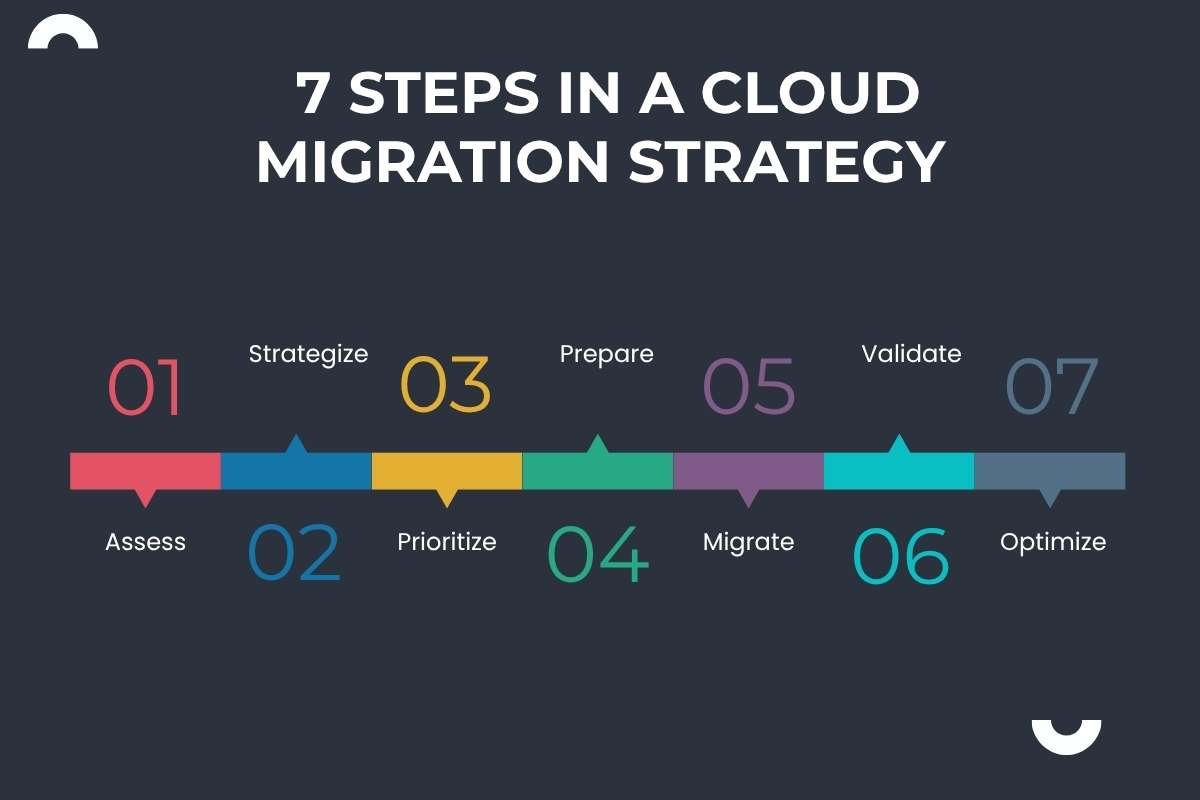
A large company needs more than a technical migration plan. It needs a repeatable decision framework that can work across hundreds or thousands of applications.
Below is a practical seven-stage model:
Step 1: Assess
Start by building a reliable picture of the current environment. Inventory applications, servers, databases, integrations, users, data, dependencies, licensing arrangements, performance requirements, security requirements, and business owners.
The key question is simple: What do we actually have?
Start by reviewing each application, its dependencies, and its migration needs.
Step 2: Strategize
Decide why the organization is moving to the cloud. This could mean lowering infrastructure costs, improving reliability, modernizing applications, or supporting growth.
Then set the target architecture, security rules, governance, and success measures.
Step 3: Prioritize
Don’t move applications in any random order. Prioritize them based on business value, complexity, dependencies, risk, and cloud readiness.
A simple approach is:
- High value, low complexity: Move early
- High value, high complexity: Plan carefully
- Low value, low complexity: Retire, replace, or move later
- Low value, high complexity: Consider keeping or retiring
This gives the migration a clear order and makes each move easier to plan.
Step 4: Prepare
Prepare the basics before moving critical workloads.
Set up access controls, networking, security, monitoring, backups, recovery, cost controls, and staff training first. Test the setup with smaller workloads before moving critical applications.
Step 5: Migrate
Move workloads in controlled waves.
Start with a manageable pilot rather than treating the first production migration as a company-wide event. Use lessons from early migrations to improve repeatable processes for later waves.
For larger environments, standardized migration patterns can reduce repeated engineering work.
Step 6: Validate
Moving an application to the cloud does not mean the migration is complete. Compare its performance before and after the move, including speed, availability, security, user experience, and cost.
Set clear benchmarks before migration and check them again after the move to see if the application is performing as expected.
Step 7: Optimize
Migration is only the beginning. After moving to the cloud, teams should remove unused resources, control costs, improve performance, and automate routine tasks.
Regular optimization helps keep the cloud environment efficient over time.
How much does enterprise cloud migration cost?
The cost depends on the number of workloads, application complexity, data volume, compliance needs, modernization plans, and existing infrastructure.
An enterprise should separate at least four types of spending:
| Cost category | What it includes | Why it matters |
| Migration cost | Assessment, tools, engineering, data transfer, testing | One-time or project-based investment |
| Modernization cost | Refactoring, containers, architecture changes | Can extend migration timelines |
| Cloud operating cost | Compute, storage, databases, networking, services | Recurring expense |
| Transformation cost | Training, governance, security, new processes | Supports long-term adoption |
The financial model should also include the costs of the current environment.
That means comparing cloud spending against existing data-center operations, hardware refreshes, software licenses, facilities, support staff, disaster recovery, and other relevant expenses.
What security and governance risks should a cloud migration strategy address?

Moving workloads to the cloud can also create new governance needs as applications, data, identities, and infrastructure spread across different environments.
A cloud migration strategy should cover these key areas:
- Identity and access: Control who can access applications, data, and cloud resources.
- Data protection: Use encryption and clear rules for storing and moving sensitive data.
- Compliance: Make sure cloud workloads continue to meet legal and industry requirements.
- Network security: Protect connections between cloud systems, users, and on-premises infrastructure.
- Backup and recovery: Keep reliable backups and recovery plans for critical workloads.
- Monitoring and logging: Track system activity to identify unusual behavior and security issues.
- Third-party dependencies: Review external services that applications rely on and the risks they may introduce.
- Vendor reliance: Check how much an application depends on services that are specific to one cloud provider.
- Incident response: Define how security incidents will be detected, contained, and resolved.
These requirements should be defined before workloads are moved.
Vendor reliance also needs attention. Applications that depend heavily on provider-specific services may be harder to move later. This does not mean every organization needs a multicloud setup. It means the long-term trade-offs should be clear before critical systems are committed to a specific cloud environment.
What should you measure after cloud migration strategy?
A migration dashboard should show more than the number of applications moved. Executives need evidence that the migration is improving the business.
| KPI category | Example metrics | What it tells leadership |
| Financial | Cloud spend, cost per workload, savings | Whether the business case is working |
| Performance | Latency, response time, availability | Whether applications perform as expected |
| Operational | Incidents, deployment frequency, recovery time | Whether operations have improved |
| Security | Vulnerabilities, policy violations, access events | Whether risk is controlled |
| Business | Revenue impact, productivity, customer experience | Whether migration creates business value |
| Migration | Workloads completed, failed migrations, downtime | Whether execution is on track |
If an application took 500 milliseconds to respond before migration, the enterprise should know what happened afterward. If infrastructure costs $X per month before migration, the organization should be able to explain the change rather than simply report the new cloud bill.
FinOps also plays a role in controlling cloud costs. Flexera’s 2026 research found that 63% of organizations surveyed had FinOps teams to help manage cloud spending.
Conclusion:
A successful cloud move starts with a clear plan. A cloud migration strategy gives teams a practical framework to assess workloads, strategize, prioritize, prepare, migrate, validate, and optimize.
It also helps teams control costs, plan for security, and measure whether the move is delivering the expected results. The goal is not simply to move workloads, but to build a cloud environment that works better for the business.
Frequently asked questions
1. How do you migrate a legacy application to the cloud?
Start by assessing its architecture and dependencies, then choose whether to rehost, replatform, refactor, replace, or retire it.
2. How can businesses avoid cloud migration downtime?
Use staged migrations, testing, backup systems, and carefully planned cutover processes to reduce service disruption.
3. What skills are needed for a cloud migration project?
Common skills include cloud architecture, networking, security, application development, data management, automation, and cost management.
4. How do you decide which applications to migrate first?
Consider business value, technical complexity, dependencies, risk, compliance needs, and migration effort.
5. What are common cloud migration strategy mistakes to avoid?
Common mistakes include poor workload assessment, weak cost controls, inadequate testing, unclear ownership, and overlooking application dependencies.