
Cloud applications, remote access, and third-party services have changed how businesses operate and expanded the number of users and devices accessing sensitive resources. Zero Trust Security strengthens access control by verifying every access request based on identity, device, and security policies instead of automatically trusting users inside the network.
NIST formalised the Zero Trust Architecture in 2020 through SP 800-207. Understanding its approach helps businesses determine which security controls to prioritise, where to apply them, and how to assess their effectiveness.
What Is Zero Trust Security?
Zero Trust Security is a cybersecurity approach that verifies users, devices, applications, and workloads before granting access to business resources. It follows the principle of “never trust, always verify,” meaning that no access request is automatically approved.
Under this model, access decisions consider factors such as:
- User identity: Whether the person or service requesting access is authenticated.
- Device security: Whether the device meets the organization’s security requirements.
- Access permissions: Whether the user has authorization to reach the requested resource.
- Context and risk: Whether the request involves unusual activity, location, or other risk indicators.
Why Is Zero Trust Security Important for Modern Businesses?
Businesses now rely on remote access, cloud platforms, and third-party connections, creating more entry points that require protection.

Some common security challenges include:
- Compromised credentials: Attackers can use stolen usernames and passwords to access business applications.
- Remote access risks: Unmanaged or poorly secured devices can expose company resources.
- Cloud security complexity: Data and applications spread across multiple environments require consistent access policies.
- Insider threats: Employees or contractors may misuse permissions, intentionally or accidentally.
- Third-party access: Vendors and service providers may need access to business systems, increasing the number of external identities to manage.
How Does Zero Trust Security Work?
Zero Trust evaluates access requests before granting permission and can reassess access when relevant security conditions change.
- Access request: The employee attempts to open the financial application using an approved device.
- Identity verification: The identity system checks the employee’s credentials and may require multi-factor authentication (MFA).
- Device assessment: Security controls verify that the device meets requirements, such as having up-to-date software and endpoint protection.
- Access authorization: The system evaluates the employee’s role and determines whether access to the requested application is permitted.
- Policy enforcement: The employee receives only the access required for the assigned responsibilities. Requests that fail policy checks are denied or restricted.
- Continuous evaluation: Security systems monitor relevant changes in device compliance, user behaviour, and risk signals during a session. If a security condition changes, the organization can reassess access and restrict or revoke permissions when necessary.
What Are the Core Principles of Zero Trust?
Zero Trust Security follows three main principles:

1. Verify Explicitly
Check every access request using details such as user identity, device security, location, and risk. Never approve access just because someone is connected to the company network.
2. Apply Least-Privilege Access
Give users access only to the systems and information they need for their work. This limits the damage if an account is compromised.
3. Assume a Breach
Operate on the assumption that a security compromise could occur. Monitor activity, limit access, and reduce the potential impact of compromised accounts or devices
What Are the Five Pillars of Zero Trust Security?
The Cybersecurity and Infrastructure Security Agency (CISA) organizes its Zero Trust Maturity Model around five security pillars:
| Pillar | What It Protects |
| Identity | Employees, administrators, contractors, and service accounts through authentication and access policies. |
| Devices | Laptops, smartphones, servers, and other connected endpoints through security checks and device management. |
| Networks | Connections and communication paths through segmentation, encryption, and access restrictions. |
| Applications and Workloads | Business applications, software services, and workloads through controlled access and security monitoring. |
| Data | Sensitive information through classification, encryption, permissions, and data protection policies. |
CISA also identifies three cross-cutting capabilities that support all five pillars: Visibility and Analytics, Automation and Orchestration, and Governance.
Key Technologies Behind Zero Trust Security
Zero Trust depends on multiple technologies working together. The exact combination varies according to an organization’s infrastructure, security requirements, and existing systems.
| Technology | Role in a Zero Trust Environment |
| Identity and Access Management (IAM) | Manages user identities, authentication, and access permissions. |
| Multi-Factor Authentication (MFA) | Adds another verification step beyond a password. |
| Endpoint Detection and Response (EDR) | Detects suspicious endpoint activity and supports investigation and threat response. |
| Zero Trust Network Access (ZTNA) | Provides controlled access to specific applications instead of granting broad network access. |
| Microsegmentation | Divides networks or workloads into smaller segments to restrict unnecessary communication. |
| Data Loss Prevention (DLP) | Helps detect and prevent unauthorized sharing or transfer of sensitive information. |
| Security Information and Event Management (SIEM) | Collects and correlates security events to help identify suspicious activity across systems. |
How Does Zero Trust Benefit Businesses?

- Reduced Credential Abuse Risks: Limits the resources accessible through compromised user accounts.
- Stronger Data Protection: Applies access restrictions and security policies to sensitive business information.
- Limited Lateral Movement: Segments networks and workloads to make it harder for attackers to move between systems.
- Improved Threat Visibility: Combines security signals from users, devices, and applications to support threat detection.
- Secure Remote Access: Provides controlled access to business applications without relying solely on traditional network boundaries.
Real-World Example: How DXC Technology Applied Zero Trust
The business value of Zero Trust can be seen in DXC Technology’s implementation of Zscaler Zero Trust Exchange. To support its virtual-first operating model and globally distributed workforce, the IT services company deployed the platform in just 90 days, covering more than 130,000 users.
According to Zscaler’s customer case study, the platform processed over 40 billion transactions and 1,982 TB of traffic during its first three months. It also prevented 1.3 billion policy violations and blocked 9.2 million threats in one quarter.
These vendor-reported results demonstrate how Zero Trust controls can support secure access at enterprise scale while helping organizations manage distributed operations.
How Can Organizations Implement Zero Trust Security?
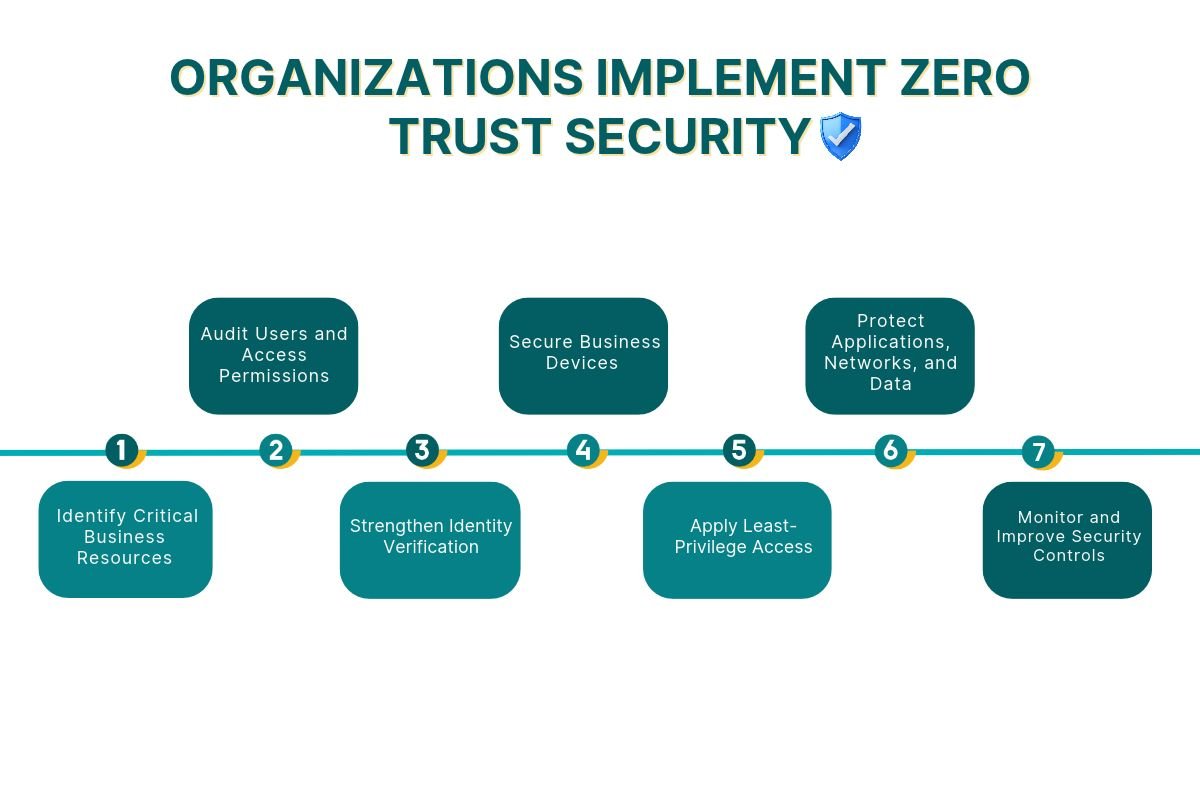
Organizations can adopt Zero Trust through a step-by-step approach that prioritizes critical resources and strengthens access controls.
Step 1: Identify Critical Business Resources
List sensitive data, essential applications, and systems that need stronger protection. Prioritize resources based on business risk.
Step 2: Audit Users and Access Permissions
Review employee, administrator, contractor, and third-party accounts. Remove unnecessary permissions and outdated access.
Step 3: Strengthen Identity Verification
Enable multi-factor authentication (MFA) and apply stronger authentication policies, especially for privileged accounts.
Step 4: Secure Business Devices
Require updated software, encryption, and endpoint protection before allowing devices to access company resources.
Step 5: Apply Least-Privilege Access
Assign permissions based on job roles and limit access to only the systems and information users need.
Step 6: Protect Applications, Networks, and Data
Use Zero Trust Network Access (ZTNA), network segmentation, and encryption to control access and protect sensitive resources.
Step 7: Monitor and Improve Security Controls
Review these controls regularly and expand coverage to additional systems based on security risks and implementation priorities.
Common Barriers to Zero Trust Adoption
- Legacy infrastructure: Older applications and systems may not support modern authentication or access controls.
- Integration complexity: Connecting identity, endpoint, network, and monitoring tools can require significant planning.
- User experience: Strict or poorly configured policies may interrupt legitimate work and create unnecessary access delays.
- Implementation costs: New technologies, integration work, training, and ongoing maintenance require financial and technical resources.
- Limited visibility: Organizations with incomplete asset inventories or inconsistent logs may struggle to make accurate access decisions.
Key Metrics for Measuring Zero Trust Implementation
Businesses need measurable indicators to determine whether their Zero Trust controls are reducing unnecessary access and improving protection across critical resources. Useful metrics include:
| Metric | What It Measures |
| MFA Coverage | Percentage of users and privileged accounts protected by MFA. |
| Device Compliance | Percentage of devices meeting defined security requirements before access is granted. |
| Privileged Access Review Rate | Percentage of privileged accounts reviewed regularly for unnecessary permissions. |
| Application Coverage | Percentage of critical applications protected by defined access policies. |
| Access Policy Enforcement | Percentage of critical access requests evaluated against security policies, including denied or restricted requests requiring investigation. |
| Data Protection Coverage | Percentage of sensitive data covered by classification, encryption, and access controls. |
Conclusion
Zero Trust Security helps organisations build stronger control over their digital environments while reducing the risks associated with unauthorised access. Its effectiveness ultimately depends on how well security measures adapt to changing business needs, evolving technologies, and emerging threats.
Rather than treating it as a one-time technology investment, organizations should view Zero Trust as an ongoing approach to protecting business resources as their IT environments evolve.
Frequently Asked Questions:
1. Can Zero Trust Security prevent all cyberattacks?
No. Zero Trust reduces unauthorized access and limits the impact of compromised accounts or devices, but it cannot prevent every cyberattack.
2. Does Zero Trust replace traditional VPNs?
Not always. ZTNA can replace VPNs for many application-access use cases, while some legacy systems may still require VPNs.
3. Is Zero Trust suitable for small businesses?
Yes. Small businesses can start with MFA, role-based access, device security, and regular access reviews.
4. How long does Zero Trust implementation take?
There is no fixed timeline. It depends on the organization’s infrastructure, security maturity, resources, and implementation scope.