Cloud spending can grow faster than businesses expect. According to Flexera’s 2025 State of the Cloud Report, 84% of respondents identified managing cloud spend as a top cloud challenge, highlighting the growing need for financial visibility and control.
Effective Cloud cost management helps businesses understand where their money goes and how to spend it better. By right-sizing resources, forecasting expenses, detecting cost spikes, and applying the right strategies, organisations scale efficiently without compromising performance or reliability.
Table of content
- What is Cloud Cost Management and How Does It Work?
- What are the Best Cloud Cost Management Strategies?
- How to Implement a Cloud Cost Management Plan?
- Which Tools Help Businesses Track Cloud Spending?
- Benefits of Cloud Cost Management: Economic metrics to evaluate cloud costs
- What Common Pitfalls Should Businesses Avoid?
- Pre-Deployment Cost Checklist
- Conclusion
- FAQs
What is cloud cost management and how does it work?

Managing cloud expenses allows businesses to track, control, and optimise their cloud spending. It gives teams visibility into where their money goes and where they can reduce waste.
It works by monitoring cloud usage and billing data, setting budgets, predicting spending trends, and identifying optimisation opportunities. This helps businesses control costs while maintaining performance and reliability.
What are the best cloud cost management strategies?
Businesses can use these strategies to control cloud costs without compromising operational requirements.
1. Right-size cloud resources
Match computing, memory, and database capacity with actual workload requirements. Analyse utilisation patterns before resizing resources to prevent performance degradation.
2. Identify and eliminate unused resources
Review idle virtual machines, unattached storage volumes, and redundant development environments. Verify dependencies, ownership, and retention requirements before removing resources.
3. Set cloud budgets and spending alerts
Establish budgets based on historical spending, forecast demand, and planned projects. Configure alerts to notify relevant teams when actual or forecast expenditure approaches defined thresholds.
Alerts improve visibility but do not necessarily stop spending automatically.
4. Detect and prevent unexpected cloud cost spikes
Unexpected cloud bills may result from traffic surges, new deployments, misconfigured resources, or increased data transfer charges.
Businesses can manage these spikes by:
- Monitoring anomalies: Flag unusual spending patterns across services and accounts.
- Investigating root causes: Review usage reports, deployment changes, and billing categories.
- Preventing recurrence: Apply suitable budgets, quotas, alerts, or controlled automation.
- Validating corrective actions: Check dependencies and service performance before modifying resources.
For example, a sudden increase in data transfer charges may indicate a change in application traffic or architecture. Identifying the cause helps teams correct the issue instead of cutting resources indiscriminately.
The FinOps Foundation recommends structured anomaly detection, ownership, investigation, and resolution processes to minimise business impact.
5. Optimise cloud pricing models
Compare cloud pricing options based on workload needs, expected usage, and flexibility. Pay-as-you-go suits changing demand, commitments may reduce costs for steady workloads, and spot capacity can help save on tasks that can handle interruptions.
6. Track and allocate cloud costs
Use resource tags, labels, accounts, or cost centres to connect expenses with products, departments, and projects.
For example, a business with a ₹1,00,000 monthly cloud bill might allocate ₹60,000 to Product A, ₹25,000 to Product B, and ₹15,000 to shared infrastructure.
The shared ₹15,000 should be distributed using a documented, appropriate allocation method. This helps teams understand their actual cost responsibilities without misrepresenting shared expenses.
How to implement a cloud cost management plan?
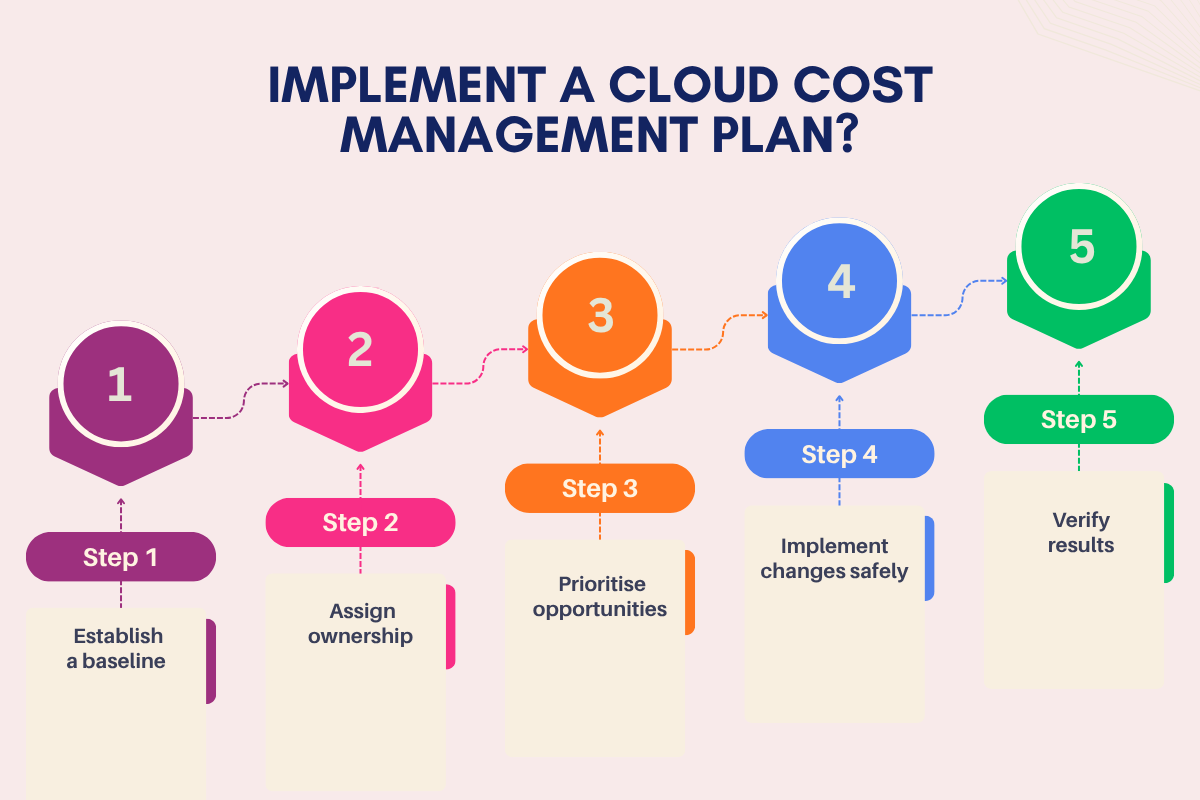
A structured implementation plan helps businesses turn spending insights into measurable improvements.
Step 1: Establish a baseline: Review recent bills, service usage, and spending patterns to understand current costs.
Step 2: Assign ownership: Identify the teams responsible for cloud resources, budgets, and optimisation decisions.
Step 3: Prioritise opportunities: Rank potential improvements by financial impact, implementation effort, and operational risk.
Step 4: Implement changes safely: Test right-sizing, scheduling, or configuration changes before broader deployment.
Step 5: Verify results: Compare equivalent workloads before and after optimisation. Review total costs, cost per unit, latency, error rates, and availability.
Real-world impact: How a SaaS company reduced AWS costs by 39%?
In July 2026, AWS reported how a SaaS organisation reduced its monthly infrastructure costs by 39% in 12 weeks, while preparing for 10x growth.
The company initially spent around $35,000 per month on AWS infrastructure. Its engineering team identified cost inefficiencies, including oversized workloads, outdated storage volumes, unnecessary network charges, and underutilised resources.
To address these issues, the team:
- Migrated eligible storage volumes to more cost-efficient options.
- Right-sized compute resources and modernised infrastructure.
- Consolidated more than 150 Network Load Balancers into five Application Load Balancers, using a phased migration approach.
- Improved storage tiering and workload scaling.
These changes delivered $13,700 in monthly savings, reducing infrastructure expenditure by 39%. The load balancer consolidation was completed without downtime, according to AWS.
The case demonstrates how businesses can combine cost visibility, prioritised optimisation, and careful implementation to reduce expenses while protecting service continuity.
Which tools help businesses track cloud spending?
Cloud provider tools help businesses monitor spending, analyse usage, manage budgets, and identify optimisation opportunities.
| Tool | Key Functions | Best for | How to Choose |
| AWS Cost Explorer & AWS Budgets | Track costs, analyse trends, set budgets | AWS users | Choose for AWS cost tracking and budgeting |
| Microsoft Cost Management | Analyse spending and manage budgets | Azure users | Choose for Azure billing visibility and cost control |
| Google Cloud cost management tools | Review billing and monitor costs | Google Cloud users | Choose for Google Cloud spending analysis |
| AI-powered cost management tools | Forecast spending, flag anomalies, suggest savings | Businesses needing advanced insights | Choose for multi-cloud visibility or advanced analytics |
Benefits of cloud cost management
- Cash Flow Stability: Reduces unexpected financial pressure.
- Cross-Team Coordination: Aligns financial and technical decisions.
- Stronger Governance: Reinforces spending policies and controls.
- Innovation Capacity: Frees funds for new initiatives.
The importance of cloud spending visibility in identifying inefficiencies, controlling costs, and making informed business decisions was highlighted by Deepak Mittal, CEO of CloudKeeper, who stated, “You can’t optimize what you can’t see.”
Economic metrics to evaluate cloud costs
| Metric | How to measure | What it shows |
| Cost per unit | Cloud costs ÷ units delivered | Cost efficiency per transaction, user, or service |
| Cloud cost ratio | Cloud costs ÷ revenue × 100 | Cloud spending as a share of revenue |
| Cost savings (%) | (Baseline cost − Current cost) ÷ Baseline cost × 100 | Cost reduction against a defined baseline |
| Cloud ROI | ((Financial benefits − Cloud investment) ÷ Cloud investment) × 100 | Return relative to cloud investment |
What common pitfalls should businesses avoid?

- Demand uncertainty: Unexpected traffic changes can make forecasts inaccurate.
- Incomplete cost visibility: Shared resources and fragmented billing data can distort team-level spending.
- Hidden charges: Data transfer, support, licensing, and storage operations may increase total costs.
- Over-optimisation: Excessive resource cuts can affect performance, availability, or recovery capabilities.
- Discount commitments: Long-term commitments may create financial risk if usage falls below expectations.
Pre-deployment cost checklist
Before launching a new cloud project, check the following:
- Review service pricing: Check current rates, billing units, and extra charges for selected services.
- Check data transfer costs: Review charges for moving data between regions, services, or cloud providers.
- Review storage needs: Include backup, recovery, and long-term data storage costs.
- Check software licenses: Include paid software, database licenses, and third-party service fees.
- Estimate growth costs: Calculate how expenses may change as users, data, and transactions increase.
- Review exit costs: Check possible charges for data transfer and moving away from the service.
- Confirm cost assumptions: Record what the estimate includes and which costs may change.
Conclusion:
Effective cloud spending requires informed decisions and clear priorities. Businesses should review their usage, compare costs with business needs, and address high-impact savings opportunities.
Cloud cost management helps organisations make better investment decisions and support sustainable growth. Start by reviewing your latest cloud bill and identifying one area for improvement.
FAQs
1. Is cloud cost management suitable for startups?
Yes, it helps startups control spending and allocate limited resources effectively.
2. Which team should lead cloud cost management?
FinOps encourages finance, engineering, and business teams to share responsibility.
3. Can cloud cost management support sustainability goals?
Yes, efficient resource utilisation can reduce unnecessary energy consumption.
4. Does cloud cost management require specialised expertise?
Not always, as basic budgeting and monitoring tools can help small teams manage expenses.